
Stock control and order processing software
If you can only find out what you have in stock by walking to the racking, or an order gets typed in three times before it ships, the problem is not your team.
Stock problems are rarely about the stock. They are about the gaps between the places information is kept.
An order arrives by email and gets written on a pad. The pad gets typed into a spreadsheet. The spreadsheet gets typed into the accounts package. Somewhere in that chain, a quantity changes, and now the system says there are fourteen and the shelf says nine.
What changes
Information gets entered once, by the person closest to it, at the moment it happens. Everything downstream reads from the same place. The stock figure is right because nothing had to be copied for it to get there.
That is not a technology achievement. It is just what happens when the software matches the process instead of the other way round.
Is that an ERP?
Mostly, yes, and it is worth being plain about which parts.
What people usually mean by ERP is one system where orders, stock, purchasing, despatch and the numbers all agree with each other. That is what this is. Add production planning and you have covered what most businesses in this region are actually trying to buy when they go looking for an ERP.
What we do not do is replace your ledgers. Your accounts package keeps the finances and we pass invoices and purchase orders into it, because moving your finance system is a separate project with its own risk, and it is rarely the thing that was hurting.
The reason this matters is money. A full ERP is priced as a suite, and most businesses we see are quoted for modules they will never switch on. Build only the parts that carry your work and you pay for those parts, you keep the accounts system your bookkeeper already knows, and the one process that actually makes you money gets built properly instead of being worked around.
If a package is the better answer, we will tell you. Sometimes it is.
Where it starts
A conversation and a walk round. We would rather see the job being done than read a requirements document about it.
What is included
What you get
Live stock levels
What is on the shelf, what is allocated, what is on order and what is genuinely available to sell.
Order capture
Orders entered once, however they arrive. Phone, email, trade counter or web, in one place.
Picking and despatch
Pick lists in a sensible order, barcode scanning where it helps, and despatch notes generated rather than typed.
Purchasing
Reorder points, supplier lead times and purchase orders raised from what is actually running low.
Multiple locations
Stock by site or bin, with transfers recorded so the figures stay true.
Pricing
Customer specific prices, discount structures and quantity breaks applied without anyone having to remember them.
Accounts integration
Invoices and purchase orders passed to your accounts package instead of being rekeyed.
Reporting
Stock value, slow movers, margin by product or customer, and whatever else you currently work out by hand.
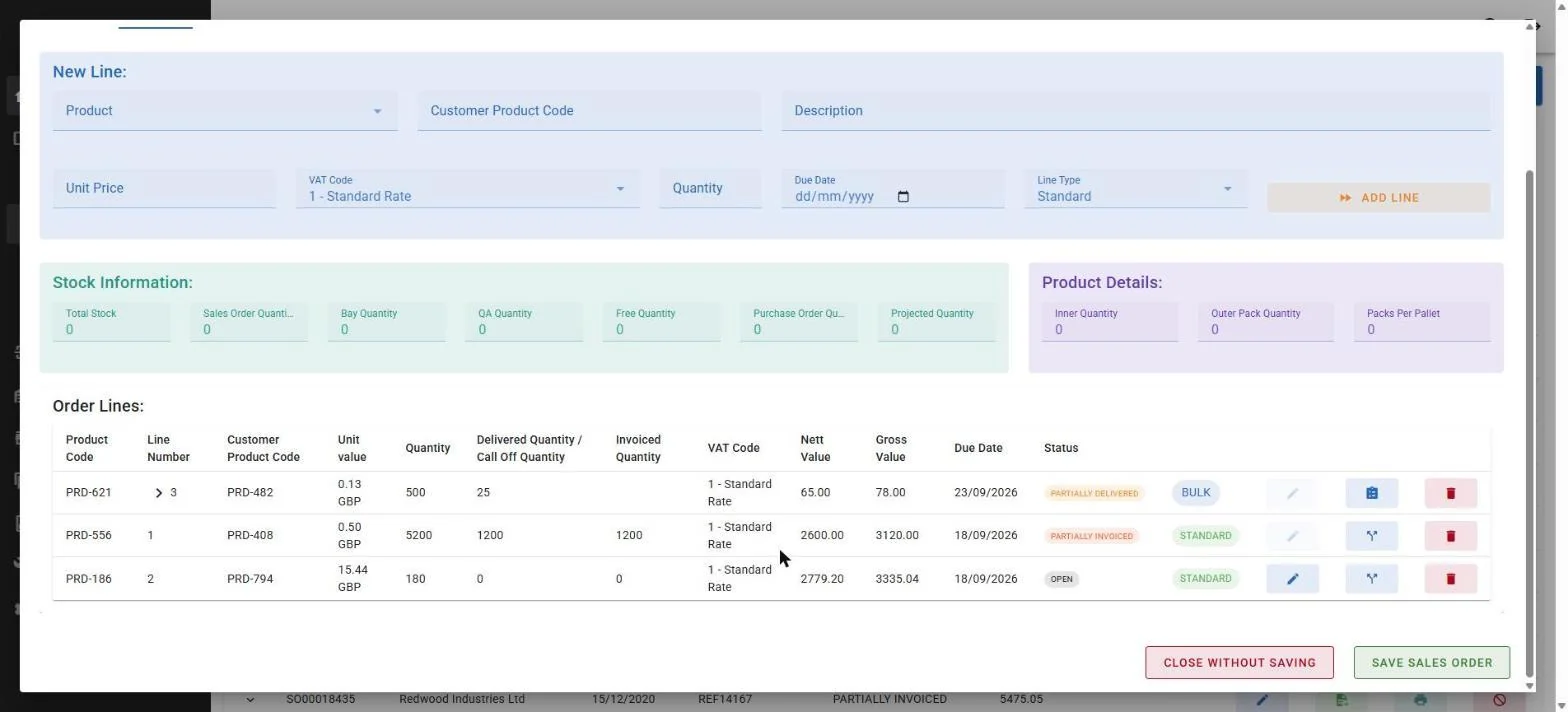
- Free to sell, not just in stockTotal stock means little on its own. The number that matters is what is left once everything already promised is taken off it.
- Committed and incoming, togetherWhat is allocated to other orders and what is on its way from a supplier, on the same screen as the order being typed.
- Part deliveries handledLines carry delivered and invoiced quantities separately, because in the real world an order rarely goes out in one piece.
How we work
What working with us looks like
- 1
Watch the process
We follow an order from arrival to despatch and note every step, including the ones that only happen on a Friday.
- 2
Scope it
A written scope and a fixed price. We are clear about what is in and what is not.
- 3
Build and test with your data
You test with real products and real orders, not sample data that always behaves.
- 4
Go live with us on site
We are there on the first live day, because that is the day questions come up.
Read the case study
See what this looks like in practice
Odlings Group came to us with a process off-the-shelf software could not handle.
Case study
Written in 1999. Still running today.
We shipped order processing software to a company in the Odlings Group on the 23rd of July 1999, on seven floppy disks. We still have the disks. Some of what is on them is still running in production, twenty seven years later.
Your understanding of the technology available coupled with detailed discussions on the desired outcome has produced a system with capabilities I did not imagine a business our size would be able to achieve. We have gone from a paper system, to a fully traceable production process. This has enabled our office staff to be able to communicate far more confidently with our customers.
Common questions
Can it work with our accounts package?
In most cases, yes. Integration with the accounts system is one of the most common things we are asked for, because it removes the rekeying that causes the mismatches. Tell us what you use and we will tell you what is possible.
Do we need barcode scanners?
Not necessarily. Scanning pays for itself where there is high volume or a lot of similar products. Where there is not, it can add work. We will say which applies to you.
What about our existing stock data?
We migrate it. Part of that job is cleaning it up, which is usually the point where a business finds out how many duplicate product codes it has.
Is this an ERP system?
It does the operational part of one. Sales orders, purchasing, stock, despatch, pricing and reporting are what most businesses actually mean when they say ERP, and that is what we build. The difference is that we leave your ledgers where they are and integrate with your accounts package, rather than asking you to move your finances onto a new system as well.
We have been quoted for an ERP. Should we just buy it?
Sometimes yes, and we will say so. If you need finance, HR, CRM and manufacturing in one product and you are willing to change how you work to fit it, a package is usually cheaper than building the same thing. The question worth asking is how many of the modules you are paying for you will genuinely use, and whether the one process that makes you money is the one the package cannot do.
Can staff use it on the warehouse floor?
Yes. Screens designed for a handheld or a tablet are part of the build where the work happens away from a desk.
Get in touch
Tell us what is not working
Send us a line about your setup and we will come back with what we would actually do about it. No sales pitch, no obligation.
Or call 01482 586 550 or email info@selectgroup.co.uk.
This form is provided by Growably. See our privacy policy.
Want a straight answer about your IT?
Tell us what is not working. We will tell you what we would do about it, with no sales pitch and no obligation.